Credit card bills: installments, one-offs, and multi-month import
Turn a variable debt into a card bill tracker: line items for installments and one-offs, residual for fees, multi-file import with per-month totals, and a Monthly Bill tab that stays clear as plans roll forward.
Updated for multi-month import and bill total controls
Find the right action on Debts
Every debt card now has one primary action. Fixed loans open the debt detail; cards with installment tracking open the Monthly Bill. Optional setup (“Set up installment tracking”) sits as a quiet secondary control so it never competes with “Open debt”. Edit, add purchase, complete, and reactivate live in the ⋮ menu.
Click the card body or the primary button — both go to the same place. Use ⋮ → Edit debt when you need to rename or change defaults.

Opt in on a variable card
Only variable debts can enable installment tracking. Paid schedule months stay locked. Existing predicted amounts stay until you import a statement or set a bill total. After enabling, the card shows an Installments badge and the primary action becomes “Monthly bill”.
Work the Monthly Bill tab
Lines split into installments (n/m) and one-offs (à vista). Enter the statement total: residual (fees / unlisted) fills the gap so predicted = lines + residual — never “old full bill + new lines”. Future months on the timeline show running installments until you file that month’s one-offs or total.

Import many statements at once
Import bill accepts multiple PDF/CSV files. Assign a bill month per file (guessed from names like Nubank_2026-07-01.csv). Review month by month: new vs already tracked, search and filters, keep saved total vs use statement total. Paid months keep their total locked while still importing lines for future tracking. Confirm once — all months import in a single atomic batch.
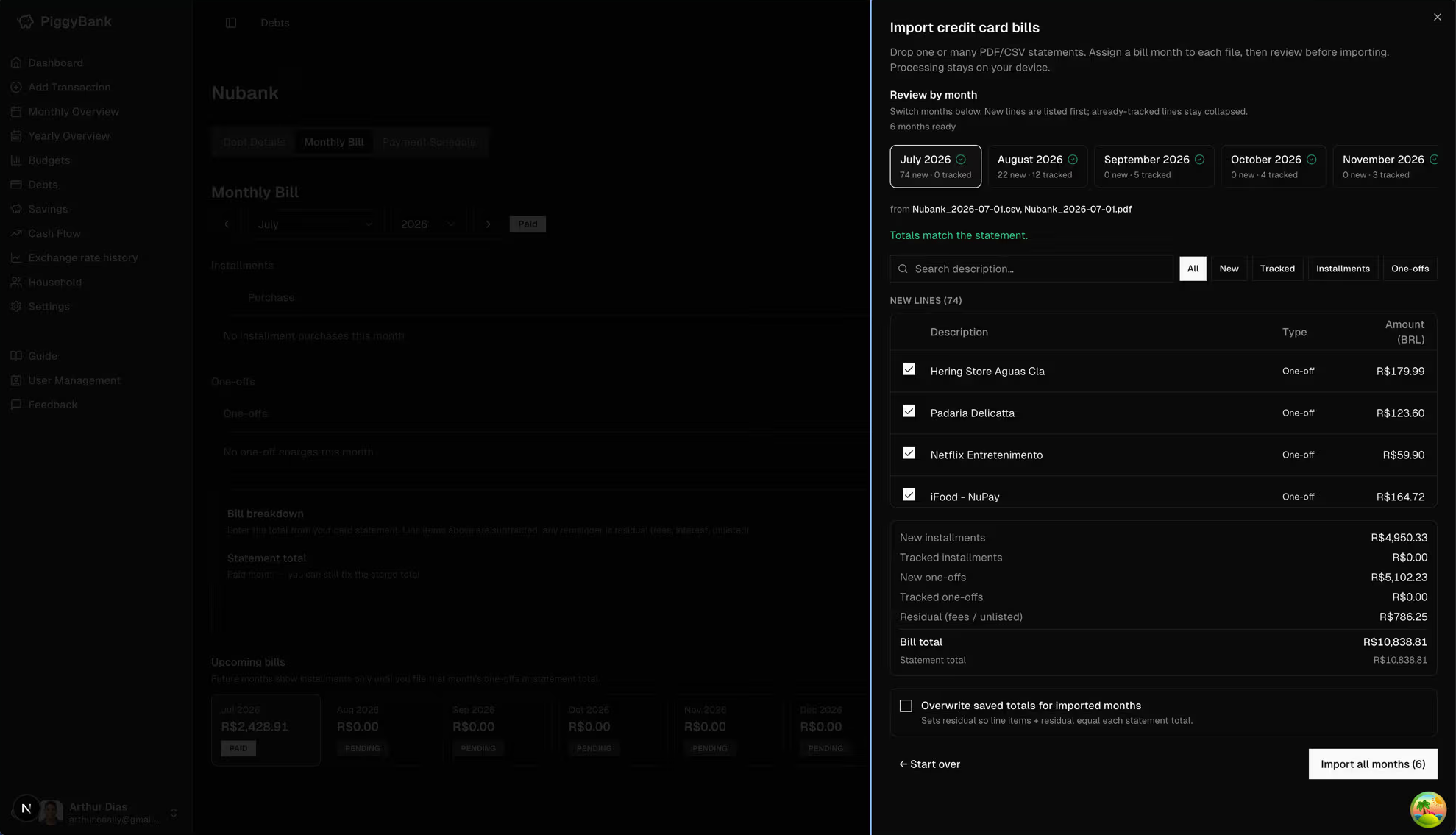
Suggested workflow
- •Enable installment tracking on each card once.
- •Backfill big running installments (or import the latest statement).
- •Each month: drop the bank export(s) → assign months → review → import.
- •For paid months, leave “Update bill total” off (or use Keep saved).
- •For open months, use statement total when the export matches the bill you owe.
For click-by-click steps inside the product, open Guide → Credit card installment tracking from the sidebar. Guide